UOAF Operations Handbook
Squadron Process
The squadron playbook for how UOAF organizes events, makes decisions, manages access, handles roster changes, and evaluates whether people are ready for the kinds of community events we run.

Quick Orientation
Mission
Serious-fun events, run consistently
UOAF exists to host detailed, epic, accessible BMS events, support training, and keep the community organized enough that large events do not dissolve into chaos.
Operating model
Leadership with real accountability
The lead is accountable for outcomes, roster members run the squadron day to day, and the frag team owns mission-planning standards and their continuous improvement.
Core systems
Discord, Drive, Groups, and event metrics
Discord is the operating floor, Google Drive stores documents, Google Groups control access, and post-event KPI review is part of how the squadron steers improvement.
Team Charter
Vision
We aspire to be the most fun, accessible, humble, and passionate flight simulation squadron in the world.
Mission
- Host detailed, well thought-out, epic, seriously fun, and consistent BMS events.
- Consider engagement with other sims when it supports squadron values.
- Host training events and maintain the codex.
- Practice community outreach.
- Keep an open door.
- Build good relationships with community leaders and content creators.
- Be the example other sim communities should aspire to.
- Re-evaluate and reassess using data collection and metrics.
- Involve the squadron frequently in direction-setting and decision-making.
Roles and Responsibilities
Lead
Current lead: Krause
- Acts as the wringable neck for the squadron.
- Prioritizes squadron resources when tradeoffs are required.
- Leads planning and squadron process as a servant leader.
- Retains veto power when there is a lack of alignment.
- Delegates powers to other patched members and mentors them on execution.
- Maintains expert-level flight sim judgment.
Roster
Patched members
- Run day-to-day moderation for events and operations.
- Uphold and enforce the Discord Community Guidelines.
- Support training, flight leading, and package leading.
- Support and improve SOPs.
- Act as the face of the squadron.
- Meet the relevant sim requirements and help others reach them.
- Give input and vote on what the squadron should do next.
- Frag and support events.
- Coordinate events.
Frag Team
Mission planning specialists
- Own standards for the frag.
- Improve and teach those standards.
- Generate the frags used in UOAF events.
Community Scope
This section defines what UOAF intentionally takes responsibility for as a community, and what it does not want to become a default operating model for.
In Scope
- BMS events
- Other types of gaming when they fit UOAF values, including DCS, IL-2, and Steel Beasts
- Cross-community events
- Content creation
- Mod development
- Videos
- Creating and supporting the codex
- Everything on Discord
- Surveying and collecting metrics
- Server maintenance and expansion
- Website ownership
Out of Scope
- TeamSpeak as the primary community platform
Values
Success Criteria
We have a set of KPIs collected after every event, and we use that data to steer improvements in the squadron.
Motto
Sordida Unguibus
"Dirty fingernails"
Communication
We use Discord to communicate over voice, post events, and share planning context.
Documents
Please store documents, including ACMI files, on the UOAF Google Drive folder. The folder is public to view, but editable only by the UOAF members Google Group, which includes all patched members.
If you need to restrict access, use the Google Drive share controls so that only uoaf-members@googlegroups.com or a narrower subset of members can see it.
Planning
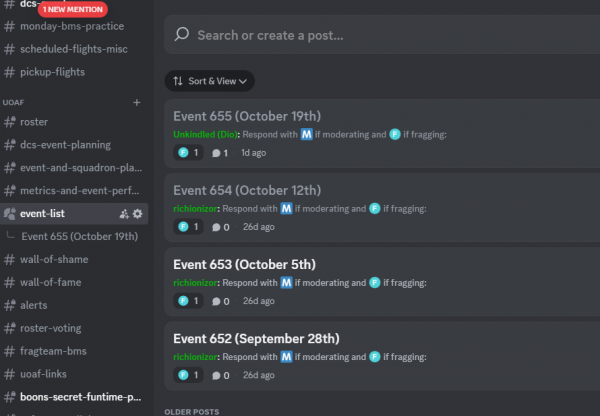
Use event threads to claim work
UOAF uses Discord threads under Event list to manage who is doing what in events. Each event must have a fragger and a moderator.
React in the thread
Respond to the event thread with the emoji reflecting fragger or moderator if you are going to participate in that role.
Plan in the squadron channels
Use #event-and-squadron-planning to discuss plans and staffing, and #metrics-and-event-performance to share event performance afterward.
Groups
Google
- Administered by
groups.google.com - Used for calendar invites, email distribution, and Google Drive write-access management
UOAF-leadershipcan manage all groups
Uoaf-members
- Address:
uoaf-members@googlegroups.com - Who: all patched members
- Permissions: edit access to the shared Drive location and view access to the broader folder structure
- Includes
UOAF-leadership
UOAF-leadership
- Who: officers and leadership team
Funding
UOAF uses a PayPal business account under uoafdonations@gmail.com.
- Recurring monthly PayPal donation link
- Members and stakeholders are encouraged to donate to help ensure continued operation of the squadron.
- The PayPal account is currently owned by Chris Krause.
- Any positive balance is held in reserve for squadron voting and future decisions.
- Any deficit is currently paid out of pocket by Chris Krause.
- Financial records are to be shared with the community whenever requested.
Voting in Patched Members
Anyone can initiate a vote for someone to become a patched member. The point of the vote is to gain consensus on whether the nominee exemplifies UOAF values and is already taking on patched-member responsibilities on their own initiative, with promise to expand those responsibilities.
We bias toward saying "no" more easily than "yes" and hold a very high personal conduct bar. Anyone we cannot say no to probably should have been a patched member already.
The squadron leader retains veto power.
Initiating a Vote
- Make a post in
#roster-votingusing this template:
text
   @Roster I'd like to nominate [@name] for roster!
   [optional reason for nomination]
   Respond to this with :goodvibes: if you think [he/she] should be one and :Disappointed: if not.
- Send an email to
uoaf-members@googlegroups.comso members who are not actively watching Discord still see the nomination and it does not get buried. - Do not discuss the nomination with the nominee during the vote, even casually to gauge interest.
Why avoid that conversation?
- We do not want nominees campaigning roster members for votes.
- If the nomination fails, either by vote or veto, we do not want the nominee to feel like the rug was pulled out from under them.
The squadron leader typically ends the voting period 72 hours after the email is sent. If the nomination succeeds, the squadron leader or a designated second should:
- Invite the nominee to the roster.
- Confirm they have read and understood this page.
- Confirm they understand how squadron funding works.
- Collect their email address.
- Add them to the UOAF members Google Group.
- Add them to the Discord
@rostertag and make the roster announcement post.
Offboarding Roster Checklist
- Remove from Google Group
- Remove
Rostertag - Remove AWS IAM account if applicable
Servers
- Server database is maintained in a shared sheet
- There is also a link containing credentials and RDP information; ask leadership for access
Check Ride for New Players
- New players without demonstrated community experience or a community sponsor elsewhere generally need a check ride before being allowed into a weekend multiplayer event.
- A check ride evaluates whether the player meets General SOPs and the requirements for the sim they want to fly.
- A check ride typically takes one hour or less.
- It should be executed one-on-one by an experienced roster member.
- BS1 created a check ride kit that covers the core requirements in a compact event-like flow.